

Website speed has a direct impact on user experience, search engine visibility, and conversion rates. Even minor delays in page load time can increase bounce rates, reduce engagement, and discourage potential customers from completing purchases or submitting inquiries.
This article will explain:
What website speed optimization involves
What affects website performance
How to measure it accurately
The most effective techniques for improving loading times
The steps you should follow to optimize website speed
Keep reading for our top web performance optimization techniques.
Quick Summary
Website speed directly affects bounce rates, conversions, and SEO rankings. Every extra second of load time increases the chance a visitor leaves.
Core Web Vitals (LCP, INP, CLS) measure real user experience, not just raw load time.
The biggest wins come from compressing images, enabling caching, using a CDN, and minifying code.
Test performance with tools like Google PageSpeed Insights, GTmetrix, or WebPageTest, and compare a few for the full picture.
Speed optimization is ongoing. Monitor with Real User Monitoring and Core Web Vitals tracking to catch regressions before they cost you traffic.
How to Improve Website Speed: Understanding the Basics
What is website speed optimization?
Website speed optimization (or website performance optimization) is the process of reducing the time it takes for pages and resources to load. It combines front-end improvements, server-side optimizations, caching strategies, and network delivery techniques to create faster browsing.
Many people only consider page load time or performance metrics, but that's a mistake. It is crucial to also consider real-world user experience, for example how quickly real users can interact with a page or how consistently pages perform under real traffic conditions.
Key metrics alone can be misleading; the goal isn't to have perfect metrics, it's to host a website that feels responsive and reliable for real users.
Why website speed matters
Website speed influences almost every important business metric, and the effects show up faster than most teams expect. Research from Google has found that "as page load time goes from one second to seven seconds, the probability of a mobile site visitor bouncing increases 113%". These increasing bounce rates are often summarized as the two to three second rule: once a page takes longer than that to become usable, a significant share of visitors will leave before they see any content at all.
Google's Core Web Vitals give this idea a measurable structure:
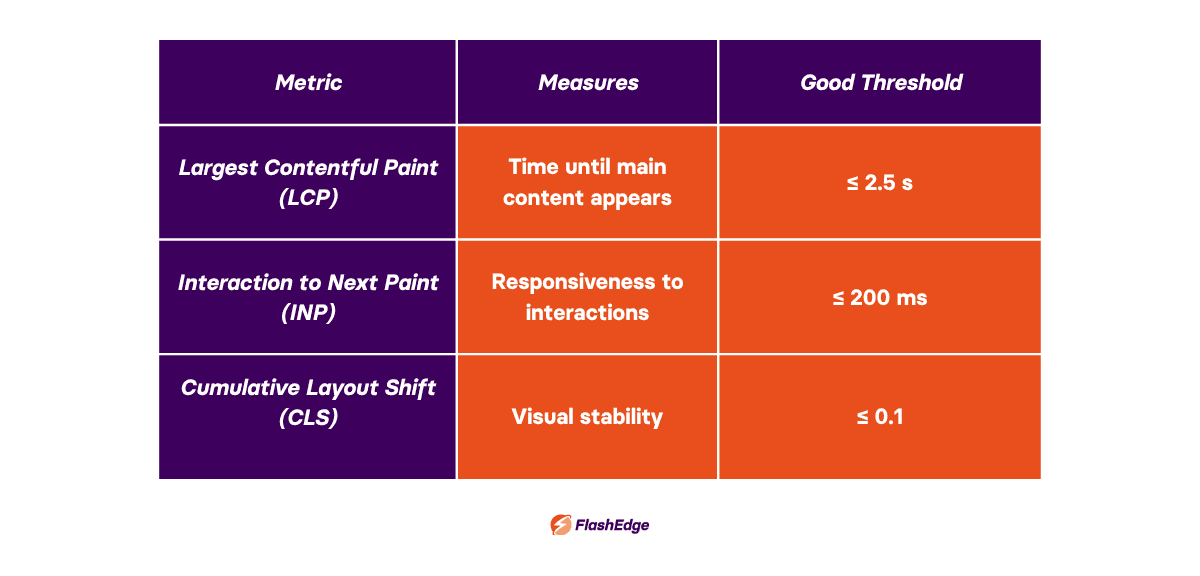
Largest Contentful Paint (LCP) tracks how quickly the main content becomes visible.
Interaction to Next Paint (INP) measures how responsive a page feels when a visitor clicks, taps, or types.
Cumulative Layout Shift (CLS) captures how much elements move around unexpectedly while a page loads.
Together, these three metrics reflect what a real visitor experiences, rather than a single abstract load-time number.
The business impact is easiest to see in ecommerce and SaaS. An online store that shaves even half a second off checkout load times will see a lift in completed purchases, since every extra second of hesitation gives a shopper another chance to abandon their cart. A SaaS product with a slow onboarding flow faces a similar problem, since a slow first-run dashboard can minimize trial-to-paid conversion before a support ticket is even filed.
A fast website:
Improves user satisfaction
Encourages visitors to browse more pages
Increases conversions
Reduces bounce rates
Supports better SEO performance
Lowers infrastructure costs through efficient delivery
Google has also confirmed that page experience and Core Web Vitals contribute to search rankings, making page speed optimization an important part of long-term SEO strategy.
Factors Affecting Website Speed
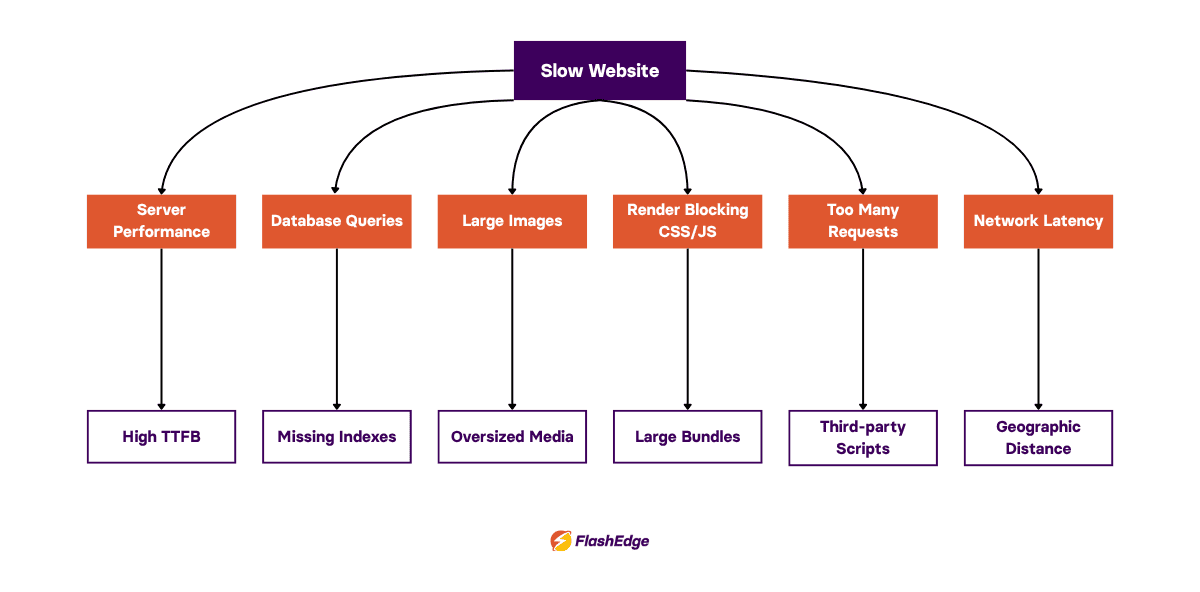
Many websites become slow because several small inefficiencies accumulate over time rather than one obvious issue. If you're wondering how to increase website speed, start by identifying whether or not you have any of the following issues:
Hosting and server performance
Even a perfectly optimized website can't overcome slow infrastructure. Your hosting provider influences server response times, available CPU and memory, storage performance, scalability during traffic spikes, and network connectivity.
Slow Time To First Byte (TTFB) often indicates problems at the server or application layer rather than the front end. If TTFB is consistently high, the bottleneck most likely sits upstream of anything a browser can fix on its own.
Database performance
Poorly optimized database queries can easily become bottlenecks as websites grow. Common issues include missing indexes, expensive joins, unnecessary database calls, and outdated CMS plugins that run redundant queries on every page load.
This is especially visible on CMS-driven sites. A WordPress site with dozens of active plugins can fire far more database queries per page than necessary, and each one adds milliseconds that compound across a busy page. Magento stores often struggle with catalog and pricing queries at scale, particularly during flash sales. On the other hand Shopify Plus merchants often avoid database-layer issues directly since the platform is managed, however heavy use of third-party apps can introduce similar slowdowns through excessive API calls on storefront pages.
Large images and media files
Images are one of the biggest contributors to page weight. Many modern devices now capture images far larger than any screen will actually display them, so if you upload large photographs directly from modern smartphones it can add several megabytes to a page before optimization.
You can deal with these issues and optimize website speed by using modern formats such as WebP and AVIF, responsive images, image compression, correct sizing, and lazy loading.
It also helps to understand the difference between lossy and lossless compression. Lossy compression, used by formats like standard JPEG and WebP, discards some image data to shrink file size, which is usually invisible at reasonable quality settings. Lossless compression preserves every pixel and removes redundant data, so file sizes shrink less dramatically but nothing is lost. Lossy compression (at a sensible quality level) suits most website photography, and lossless is better used for logos and icons where exact detail matters.
Render-blocking CSS and JavaScript
Browsers can't display content until critical resources have been processed. Large CSS files, excessive JavaScript bundles, and third-party scripts can frequently delay rendering, so visitors are left with a blank or partially-styled page.
Possible solutions to this include code splitting, deferred JavaScript, removing unused CSS, and asynchronous loading of non-critical scripts.
Too many HTTP requests
Every font, stylesheet, image, script, and icon requires a request. HTTP/2 and HTTP/3 reduce the overhead, but unnecessary requests still slow websites down (particularly on mobile connections with higher latency).
It can help to reduce requests by combining small assets, eliminating unused libraries, replacing icon fonts with SVGs, and limiting third-party scripts to the ones that earn their place on the page.
Network latency and geographic distance
Visitors located thousands of kilometers away naturally experience higher latency if content is served from a single origin server, since every request has to physically travel further and pass through more network hops along the way.
This is where Content Delivery Networks can help optimize website speed by serving cached assets from edge locations closer to users. Instead of every visitor pulling data from one origin, a CDN distributes copies of static content across servers positioned near major population centers, reducing the physical distance data has to travel. You can learn more about what businesses stand to gain from this approach in our deep-dive into the benefits of a CDN.
How to Test Website Performance
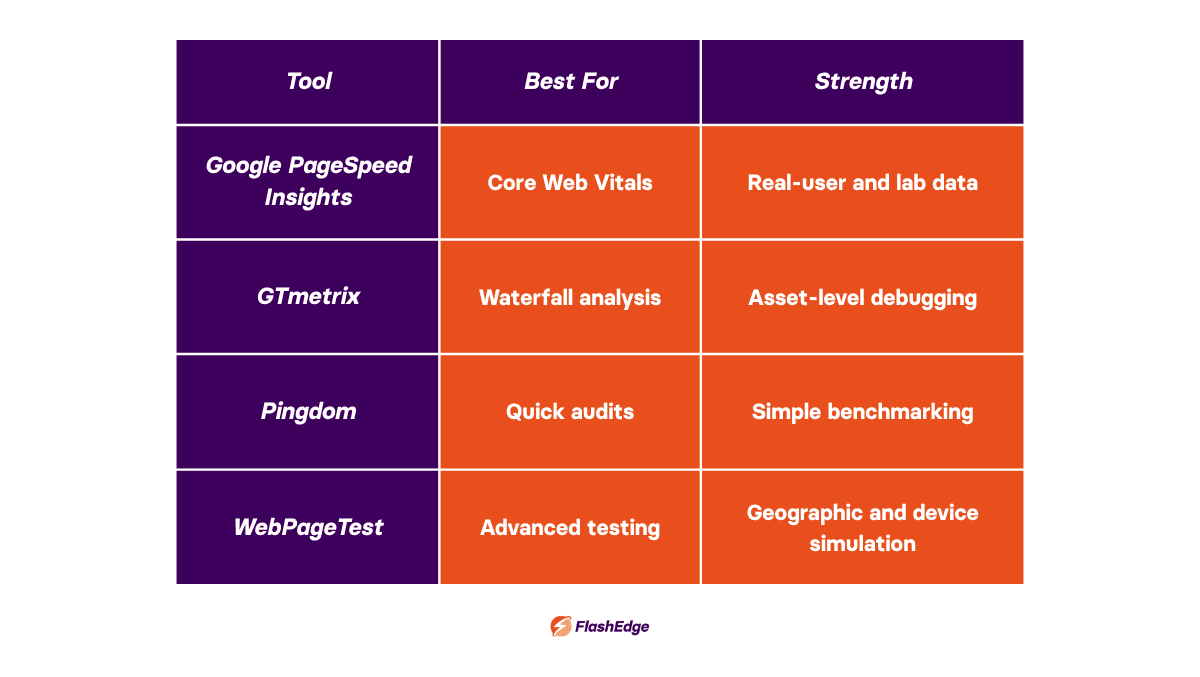
Before you can optimize website speed, you need visibility into where optimization is required. There are multiple different testing tools, all of which evaluate performance from different perspectives. We recommend that you use a few and compare their reports before making changes for the most in-depth insight.
Google PageSpeed Insights
Best for: reviewing Core Web Vitals, generating Lighthouse reports, and comparing field data from real users against lab data from simulated tests. It also provides prioritized recommendations, which can be a good starting point for teams who are unsure where to focus first. It's one of the best tools if you're learning how to improve page speed.
Try it here: Google PageSpeed Insights.
GTmetrix
Best for: waterfall charts, render timing, and detailed asset analysis, breaking down exactly which files delay a page and by how much. Particularly useful during development, when a team wants to see the immediate effect of a specific change.
Try it here: GTmetrix.
Pingdom Website Speed Test
Best for: a straightforward overview of requests, file sizes, and loading timeline. It is less detailed than some alternatives, but that simplicity suits quick benchmarking or client-facing reports.
Try it here: Pingdom Website Speed Test.
WebPageTest
Best for: extremely detailed performance testing supporting multiple browsers, mobile devices, geographic testing from different regions, repeat views to measure caching, and filmstrip analysis that shows how a page renders frame by frame.
Try it here: WebPageTest.
Each tool has a slightly different strength. Comparing results across two or three tools gives a more complete picture than relying on one alone.
Best Practices to Optimize Website Speed and Improve Performance
Use browser caching
Caching allows browsers to reuse downloaded resources instead of requesting them repeatedly on every visit. Cache-Control headers tell the browser how long a resource can be reused before it needs to check for an update, while Expires headers set a fixed expiration date for older implementations. Versioning assets, such as appending a hash to a filename whenever a file changes, allows long cache lifetimes without risking visitors seeing outdated content.
Use a CDN to increase website speed worldwide
A CDN stores copies of static assets across distributed edge servers, so visitors are served content from a location that is close to them rather than from a single origin on the other side of the world. Benefits include lower latency, reduced origin load, improved scalability, DDoS protection, and better global performance.
This works by using edge caching. When a visitor requests a page, the CDN checks whether a cached copy already exists at the nearest edge server. If it does, the request is served instantly without ever reaching the origin. This is measured by cache hit ratio, the percentage of requests served from cache rather than passed back to the origin. A high cache hit ratio means faster load times for visitors and significantly less load on origin infrastructure.
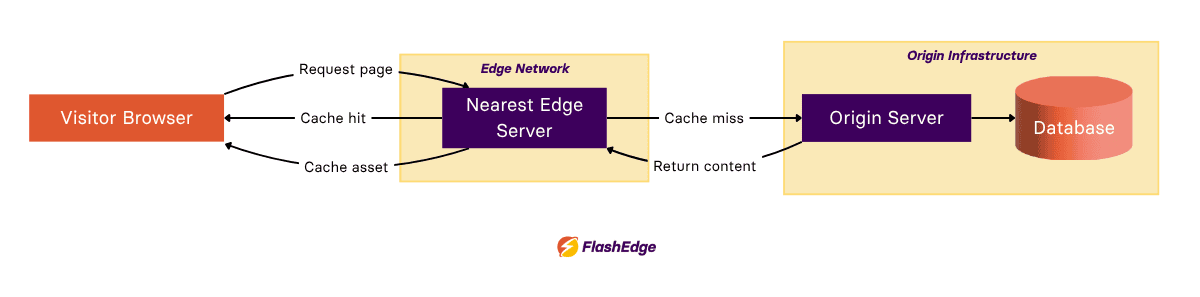
Cache invalidation is the other half of the equation. When content changes, whether it's an updated product price or a newly published blog post, the CDN needs a way to clear the outdated cached version so visitors aren't served stale content. Modern CDNs handle this with time-based expiration, where cached content automatically refreshes after a set period, and instant purge tools that let a team manually clear specific files the moment they change.
Long story short: when it comes to your CDN, correct configuration is just as important as choosing the right provider.
For businesses operating internationally, this global delivery model matters more than almost any single front-end optimization. FlashEdge is built around this principle, combining global edge delivery with intelligent caching so performance stays consistent no matter where a visitor is located. If you're curious how this looks in practice, you can try FlashEdge with a free trial.
Minify CSS, JavaScript and HTML
Minification removes whitespace, comments, and other characters that browsers don't need to interpret code, which shrinks file sizes without changing functionality. Bundling combines multiple files into fewer requests, and tree shaking removes code that is never used, such as unused functions in a JavaScript library. There are modern build tools like Webpack, Vite, and esbuild which handle most of this automatically, and all of which help speed up web applications and websites.
Compress images
One of the easiest ways to improve website loading speed is optimizing images. Beyond modern formats like WebP and AVIF, responsive images and the srcset attribute let a browser choose the most appropriately sized version of an image for a visitor's screen, rather than downloading a version built for a large desktop display. Compression tools, whether built into a CMS or run as part of a build pipeline, automate this so optimization doesn't rely on someone remembering to manually resize these files.
Enable lazy loading
Lazy loading delays the loading of images and videos until a visitor actually scrolls to them instead of immediately loading everything as soon as a page is opened.
Native lazy loading, which is supported directly by modern browsers through a simple HTML attribute, makes this straightforward without the need for extra JavaScript libraries.
Note: Above-the-fold content, particularly the largest image visible without scrolling, should generally load immediately since delaying it can hurt Largest Contentful Paint. Lazily loaded content also needs to remain discoverable and indexable to search engines.
Reduce third-party scripts
Many websites load dozens of external resources without realizing how much they add up: analytics tools, chat widgets, heatmap trackers, marketing tags, and social media embeds. Each one adds its own request, its own JavaScript execution time, and often its own render-blocking behavior.
To reclaim lost performance, carry out regular audits of which third-party scripts are still delivering value, and which ones have quietly accumulated over time but no longer serve any use.
Optimize fonts
Web fonts are another common source of hidden slowdowns. Using WOFF2, the most compressed and widely supported font format, reduces file size compared to older alternatives. Preloading critical fonts tells the browser to fetch them earlier, reducing the flash of unstyled or invisible text. Self-hosting fonts rather than pulling them from a third-party service removes an extra DNS lookup. Limiting the number of font weights in use, rather than loading six or seven variations of the same typeface, keeps total font weight manageable.
Improve server response times
Object caching stores the results of expensive database queries in memory so that repeated requests don't need to hit the database again. Database optimization, including proper indexing and query tuning, directly reduces the work a server has to do for each request. Moving to HTTP/3 and optimizing TLS handshake overhead can shave time off every connection, particularly for visitors on higher-latency mobile networks.
Remove unnecessary plugins
For CMS platforms like WordPress, plugins are easy to install and easy to forget about. Each one can add its own CSS, JavaScript, database queries, and background tasks, and many half-used plugins together often outweigh any single one. To recover performance lost to plugins, make sure you carry out a periodic audit to remove anything that isn't actively bringing value.
Continuously monitor website performance
If you're wondering how to improve website performance over the long term, it's important to understand that optimization isn't a one-time task and that you should be continuously monitoring your network performance. Lighthouse audits provide a useful snapshot during development, but Real User Monitoring (RUM) captures how actual visitors experience a site across devices, connections, and locations. Synthetic monitoring runs scheduled tests from fixed locations to catch regressions early, and ongoing Core Web Vitals tracking shows whether performance is trending the right way over time.
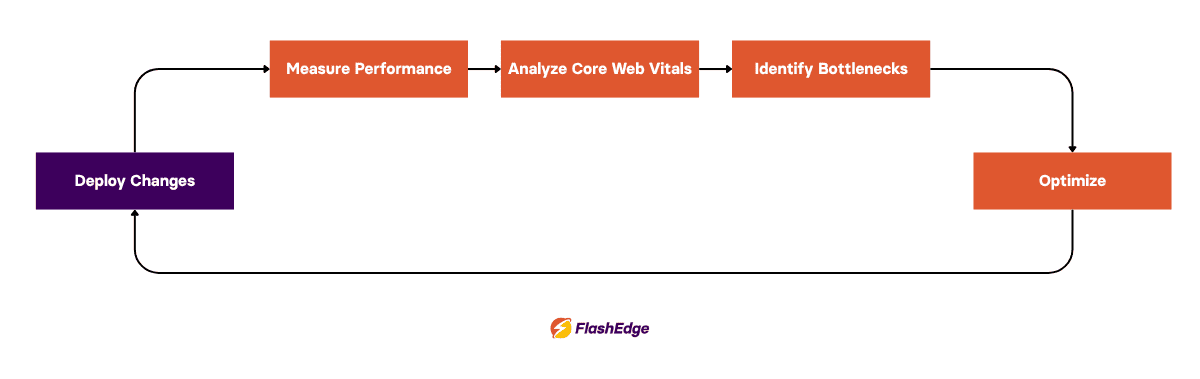
Many teams also set a performance budget, a defined limit on page weight, request count, or load time that new features can't exceed without a deliberate trade-off. Treating performance as a budget rather than an afterthought prevents small regressions from quietly adding up into a slow website months later.
Common Website Speed Optimization Mistakes
Even well-intentioned optimization efforts can go wrong in predictable ways.
Optimizing only for Lighthouse scores is one of the most common traps. A perfect lab score doesn't always reflect what real visitors experience, particularly if real-world data from actual devices and networks tells a different story. Scores are a useful indicator, not a finish line.
Another frequent mistake made by teams is forgetting mobile users. Desktop testing on a fast office connection can look excellent, but is unlikely to match the experience of a mobile user on a mid-range phone over a patchy connection; it's important to test for all scenarios.
Ignoring third-party scripts after the initial optimization push is common too, since analytics tags and marketing pixels tend to accumulate again within months of a cleanup.
Uploading oversized images is one of the most persistent issues, especially where content is added by non-technical team members without an automated compression step in place.
Not monitoring after deployment means regressions go unnoticed until traffic or conversions drop, and at this point diagnosing the cause takes far longer than if it was caught early.
Caching dynamic content incorrectly can cause serious problems, from visitors seeing another customer's cart contents to outdated pricing being served after a change goes live. Personalized content generally needs different caching rules than static assets like images and stylesheets.
Checklist to speed up website load time
Use this checklist whenever you need to speed up your website after adding new features or content.
Compress and resize all images before upload
Use modern image formats like WebP or AVIF
Enable browser caching with appropriate Cache-Control headers
Use a CDN to serve static assets from edge locations
Minify CSS, JavaScript, and HTML
Defer or eliminate render-blocking scripts
Enable lazy loading for below-the-fold media
Audit and remove unnecessary third-party scripts
Limit font weights and preload critical fonts
Keep server software and PHP versions current
Remove unused plugins and dependencies
Set up ongoing Core Web Vitals and RUM monitoring
Website speed optimization is about much more than just achieving better benchmark scores. Faster websites create smoother user experiences, improve search visibility, increase conversions, and reduce infrastructure strain.
The most successful optimization strategies combine efficient code, modern image formats, caching, high-performance hosting, and a globally distributed CDN. Instead of relying on a single change, it's smoother if you treat performance as an ongoing process that evolves alongside your website.
If you're looking to speed up your website for users around the world, FlashEdge combines global edge delivery, intelligent caching, and enterprise-grade infrastructure to help deliver faster, more reliable experiences. You can try FlashEdge with a free trial or speak with one of our specialists to discuss the best approach for your website.
Frequently Asked Questions
How do I speed up my website?
If you're wondering how to speed up your website, the most impactful changes are usually compressing images, enabling browser caching, using a CDN, and removing unnecessary JavaScript. Improving hosting quality also matters, since no amount of front-end work can fully compensate for slow server infrastructure.
What is a good website loading speed?
Under two to three seconds is a widely used target for initial load, though Core Web Vitals give a more complete picture than a single load-time number, since they also account for visual stability and interaction responsiveness. If it's over that, you should consider following the steps above to speed up website loading.
Does website speed affect SEO?
Yes. Google has confirmed that Core Web Vitals are a ranking factor, and speed also affects SEO indirectly, since slow pages tend to have higher bounce rates and lower engagement. If you improve web performance, it can have a direct impact on SEO.
How often should I test website performance?
Monthly testing is a reasonable minimum, alongside testing after every major release and continuous monitoring for business-critical sites where small regressions carry a real cost.
Explore Related Articles
➡️How to Reduce Time to First Byte (TTFB) and Slash Website Load Times
Investigate delays before your page starts loading, with ways to measure TTFB and improve server configuration, database queries, and caching.
➡️What is Cache Hit Ratio and How It Impacts Your Website's Performance?
Check how effectively your cache serves requests and identify problems with headers, TTLs, query strings, or bypass rules that reduce cache reuse.
➡️CDN Optimization Strategies for Faster Websites and Lower Latency
Get more from your CDN with better cache keys, appropriate TTLs, microcaching, and origin shielding, plus metrics for tracking the results.