
CDN configuration is one of the fastest ways to cut latency and speed up your site for users worldwide. This guide covers how to set up a CDN, which CDN settings matter most, and the mistakes worth avoiding.
Quick summary
- CDN configuration improves performance by serving content closer to users.
- A complete CDN setup covers DNS, caching, SSL, and origin server configuration.
- Testing before launch prevents downtime, caching errors, and delivery issues.
Why CDN configuration matters
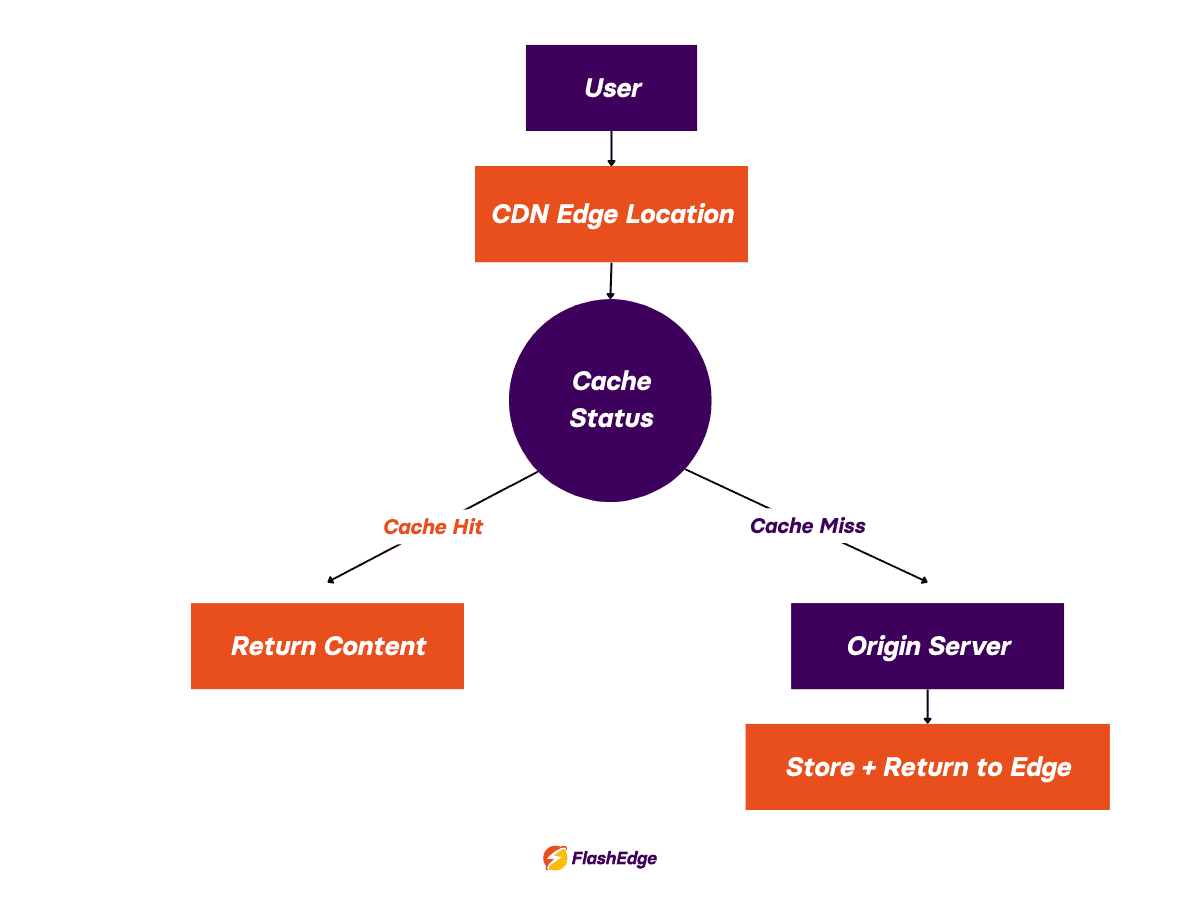
Even small delays hurt engagement and conversions. By caching content at edge locations worldwide, a CDN reduces latency, cuts bandwidth usage, and lowers origin server load. Instead of every request hitting your origin, cached content is served from the nearest edge location—improving reliability at scale.
You can't just "turn on" a CDN. The CDN settings you choose determine how efficiently the network handles requests and how much work gets offloaded from your origin.
How to configure a CDN: step by step
Step 1: Connect your domain
Update DNS records so traffic routes through the CDN's edge network rather than directly to your origin. Verify propagation, confirm SSL certificates are active, and keep a rollback option available. DNS misconfiguration causes more failed CDN deployments than anything else.
Step 2: Configure your origin server
Your origin remains the source of truth while the CDN distributes cached copies. Secure CDN implementation requires HTTPS connections to origin, proper firewall rules, and restricted direct public access. Most teams lock down origin traffic so only CDN edge servers can connect, preventing requests from bypassing the CDN entirely.
Step 3: Set up caching rules
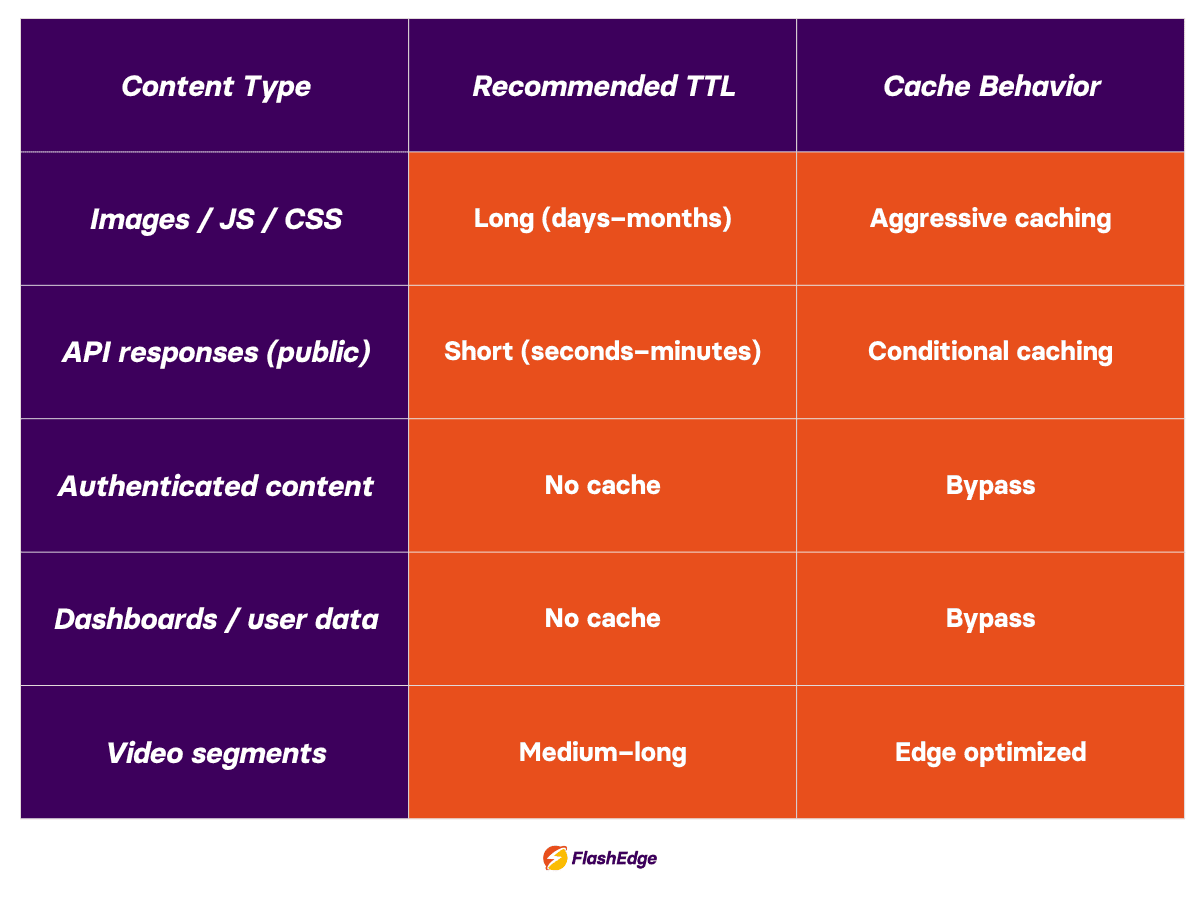
This is where CDN configuration lives or dies. Static assets like images, CSS, and JavaScript can handle longer TTL values. Dynamic content and personalised pages generally need shorter durations or bypass rules. If your settings are too aggressive they’ll likely see stale content, while if they’re too conservative you’ll negate the benefits of a CDN.
💡You can learn more about CDN caching rules on the FlashEdge blog
Step 4: Enable security and optimisation features
Beyond caching, worthwhile CDN settings include DDoS mitigation, a Web Application Firewall (WAF), Brotli/GZIP compression, HTTP/3, image optimisation, and rate limiting. These are core to solid CDN deployment, not optional extras.
Step 5: Test before going live
Before going live, validate the following in staging and production-like conditions:
- Content loads from edge locations
- SSL works
- Dynamic pages bypass cache correctly
- Cache purging functions
- Cache hit ratio validation
Once you’ve checked that the above is working correctly, compare response times before and after.
Common CDN configuration mistakes
Caching dynamic content
Dashboards, checkout flows, and account pages should bypass cache. If you cache them, you can accidentally end up serving the wrong data to users.
Wrong TTL settings
Too long delays updates; too short defeats the purpose of your CDN setup.
Leaving the origin exposed
CDN deployment without restricting direct origin access removes much of the security benefit.
Incorrect cache key design
Ignoring headers (for example, Authorization or Vary) can lead to inconsistent or insecure responses.
Not monitoring after launch
Cache hit ratios, response times, and error rates need ongoing attention as traffic patterns evolve. The FlashEdge blog has a deep dive on cache hit ratios if you’d like to learn more.
Get started with FlashEdge
Solid CDN configuration comes down to a few fundamentals: caching, DNS, SSL, origin security, and testing. If you get those right, you can benefit from faster load times, lower server load, and a more reliable experience for users everywhere.
While the configuration principles remain the same, some CDN platforms make implementation and ongoing management much easier than others. Flexible caching options, reliable performance, built-in security features, and good visibility into traffic and delivery metrics can save teams a significant amount of time and effort.
FlashEdge offers a global network with more than 400 Points of Presence, seamless AWS integration, transparent pay-as-you-go pricing, and support for both static and dynamic content delivery. If you're looking for a straightforward way to improve performance and reduce latency worldwide, start a free trial and see how FlashEdge performs in your environment.

FAQs
What is CDN configuration?
CDN configuration is the process of defining how a CDN caches, secures, and routes content between your users and your origin servers. It determines everything from how long assets are stored at the edge to how traffic is directed globally.
How do you set up a CDN?
Start by connecting your domain and pointing it to the CDN, then configure your origin server settings, set your caching rules, and enable SSL. Before going live, run tests to confirm content is being served correctly and performance is where you need it to be.
How do you implement CDN caching correctly?
The general principle is to cache static assets aggressively—images, scripts, stylesheets—while excluding dynamic or personalised content that needs to be fetched fresh for each user. Getting this distinction right is what separates a well-tuned CDN from one that's technically active but underperforming.
What are the most important CDN settings?
The settings that tend to have the biggest impact are TTL policies, SSL configuration, origin security rules, compression, and DNS routing. Together these control how efficiently your CDN delivers content, how secure the connection is, and how much load actually reaches your origin.