
If you've ever wondered what a CDN URL is, or why your assets load from a completely different domain than your main site, you're in the right place. This article breaks down the CDN URL meaning, how CDN URLs work in practice, how to get a CDN URL set up for your project, and what to watch out for along the way. Whether you're just getting started or trying to close some gaps in your knowledge, this is the practical rundown you need.
Quick Summary
- A CDN URL is a web address that delivers content through a Content Delivery Network instead of the origin server.
- It typically uses a different domain or subdomain, such as cdn.example.com instead of example.com.
- CDN URLs reduce latency by routing requests to edge servers geographically closer to users.
- They work by caching assets on distributed servers and delivering cached content on request.
What is a CDN URL?
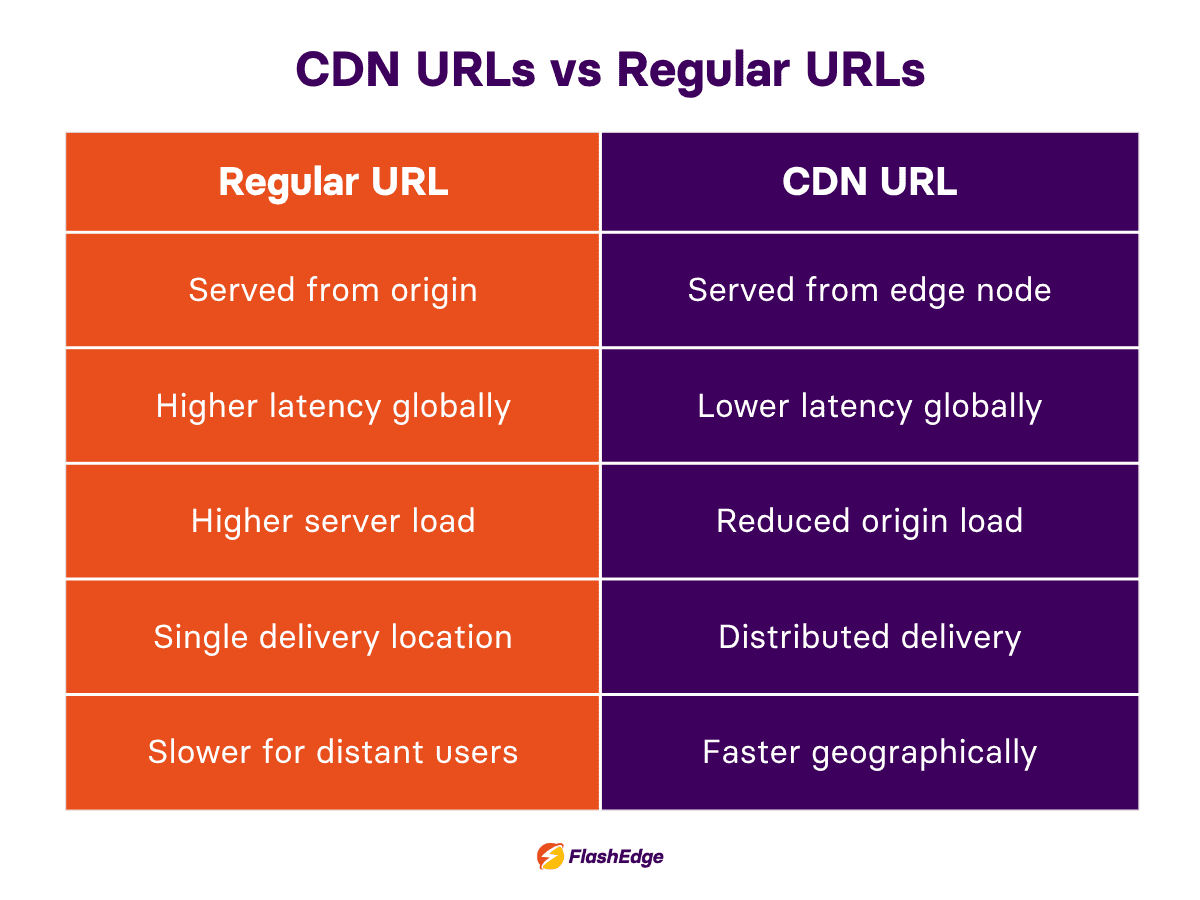
A CDN URL is a web address that routes content delivery through a Content Delivery Network instead of your origin server. Instead of every user pulling files from one central location, requests get served from the nearest edge node in a globally distributed network.
So what does CDN mean in a URL, concretely? It typically shows up as a subdomain swap. Your original asset URL might look like this:
https://yourwebsite.com/images/photo.jpg
The CDN version—a CDN image URL—looks like this:
https://cdn.yourwebsite.com/images/photo.jpg
It’s exactly the same file but delivered completely differently, so now a user in Singapore is no longer pulling that image all the way from a server in Amsterdam. Instead they’re pulling it from a local server.
How CDN URLs work behind the scenes
From origin server to edge node
When a user requests a CDN URL, the network checks whether that content is already cached at the nearest edge server. If it is, the file is returned almost instantly. If not, the CDN fetches it from your origin, serves it, and caches it for later requests. Understanding how edge caching improves performance can help you optimize cache hit rates and reduce unnecessary origin requests—read FlashEdge’s blog article on cache hit ratio to learn more.
Your CDN base URL is the root address that all of this is based on—something like https://cdn.yoursite.com/—with each asset path added after it to form complete CDN URLs.
When you need a CDN signed URL
For gated content like premium video, private downloads, anything that shouldn't be publicly accessible, a CDN signed URL embeds authentication parameters directly in the link. It's time-limited, often user-specific, and turns your CDN into a security layer as well as a performance one. Learn more about using signed URLs in the AWS docs.
How to get a CDN URL for your assets
The basic setup process
If you're wondering how to get a CDN URL configured, the steps are pretty straightforward:
- Choose a CDN provider
- Connect your origin server
- Receive your CDN base URL from the provider
- Update your asset links to point at it
Once that's done, every asset you route through the CDN gets a proper CDN image link automatically. Simple!
CDN image URL example
To make this concrete, here's a simple CDN image URL example:
- Before:
https://example.com/assets/banner.png - After:
https://cdn.example.com/assets/banner.png
If you're asking “what is my CDN root URL?”, it's the base address your provider assigns after setup; you'll usually find it waiting in your dashboard the moment configuration is complete.
Common CDN URL challenges worth knowing about
Cache invalidation
CDNs cache aggressively—that's the whole point. But when you push an update, users can get stuck on stale content. To protect against cache invalidation, you can version your asset filenames or build cache-busting into your deployment pipeline rather than relying on the CDN to figure it out.
Broken CDN image URLs
A CDN image URL that doesn't match your origin path structure silently returns a 404. To prevent this, it’s important to audit your URL patterns carefully before going live, and test across asset types.
HTTPS mismatches
Serving CDN assets over HTTP on an HTTPS site triggers browser security warnings. It’s important to note that all your CDN URL paths should be HTTPS.
Choosing the right CDN for your business
Performance, cost, and coverage
Not all CDNs are equal. Key factors to evaluate include global edge network size, geographic coverage relative to your actual user base, pricing model (per-bandwidth versus flat rate behaves very differently at scale), and how much engineering time setup and maintenance will realistically consume.
Understanding network bottlenecks and CDN speed can also make it easier to evaluate real-world performance differences between providers—FlashEdge has a blog post which explains bottlenecks in networking in detail, and how to identify, resolve, and prevent associated performance issues.
Why FlashEdge is worth a look
FlashEdge is built around making CDN URL management genuinely simple.
FlashEdge offers:
- Fast global delivery
- Straightforward CDN base URL configuration
- Built-in CDN signed URL support
- Optimized handling of every CDN image link you serve
➡️ If you want to see how it performs for your use case, why don’t you start with a free trial.
CDN URLs are simple and high-impact
Understanding the CDN URL meaning (and getting the implementation right) will make a measurable difference in how your content reaches users. The basics are pretty simple: serve content from the shortest path between your infrastructure and your users for closer delivery, faster load times, and better user experience.
FAQ
What’s the difference between a regular URL and a CDN URL?
A regular URL serves content from a central server, while a CDN URL serves cached content from distributed edge servers closer to users for faster performance.
How do I get a CDN URL?
You can get a CDN URL by connecting your website or storage bucket to a CDN provider, which then generates a CDN base URL for your assets and files.
Are CDN URLs secure?
Yes. Most CDNs support HTTPS, CDN signed URLs, and other security features to protect content and prevent unauthorized access.
Do CDN URLs improve website performance?
Yes. CDN URLs reduce latency, improve load times, and decrease the amount of traffic hitting your origin server.
What is a CDN image URL?
A CDN image URL is a direct image link served through a CDN to help images load faster for users.