
Push CDN vs. Pull CDN: What’s the Difference?
Push and pull CDNs both improve delivery speed by serving cached content from edge locations closer to users. A push CDN requires files to be uploaded to CDN storage before delivery, which gives more control but adds maintenance overhead. A pull CDN automatically retrieves files from the origin server when they are first requested, making deployment simpler for frequently updated content.
In practice, push CDNs are better suited to large static files, while pull CDNs are usually preferred for websites, APIs, and applications with changing assets. This article will explain the differences between the two, and will help you choose the best delivery method for your needs.
Push vs pull CDN quick facts
Push CDN
- Files are uploaded to CDN storage before users request them
- Best for large, static, or pre-scheduled content
- Gives more control over cached assets
- Requires manual uploads, versioning, or cache management
Pull CDN
- Files are fetched automatically from the origin on first request
- Best for frequently updated websites and applications
- Easier to deploy and maintain
- Depends more heavily on origin performance during cache misses
What is a CDN, and why does caching matter?
A CDN (short for content delivery network) distributes and stores cached copies of files across multiple edge locations so that users can download their data from a nearby server instead of a distant origin. This improves efficiency, reducing latency, origin bandwidth cost, and infrastructure load; that’s why CDNs are widely used for websites, APIs, video delivery, software downloads, and application acceleration.
Tip: You can get a more detailed technical explanation of CDN architecture in our blog article.
Understanding push CDN
A push CDN works by sending files directly from your infrastructure to CDN storage before any user requests them. Instead of waiting for the CDN to fetch content from the origin, administrators upload assets manually or through automation pipelines.
How push CDN delivery works in production
In a push workflow, files such as videos, installers, backups, or media archives are transferred to CDN cache storage or a designated storage bucket. Once uploaded, those files become available immediately through CDN endpoints.
This approach is common when files are large, rarely updated, or predictable in advance. Because the CDN doesn’t need to fetch assets from the origin each time, first-request latency is minimal and there is no dependency on a CDN origin pull event during initial delivery.
Typical use cases for push CDN
A push CDN is frequently used for:
- software releases and patches
- downloadable media libraries
- large video files
- archival content
- event content prepared before publication
When deciding between the two, it helps to think about how much of your content is scheduled in advance. CDN push models can be more favourable when availability needs to be guaranteed at launch time.
Advantages of push CDN
The main benefits include:
- full control over which assets are cached
- no unexpected origin requests
- predictable bandwidth usage
- strong performance for large static assets
Because files are uploaded intentionally, cache content remains highly controlled.
Disadvantages of push CDN
The main limitation of push CDN is operational overhead. Every file must be uploaded manually or through automation, and content changes require synchronization.
In a push CDN, updates made to a file at the source aren’t automatically reflected in cached copies already stored by the CDN, so outdated content will continue to be delivered until the same file is published under a new versioned name or the cache is purged. Storage management becomes harder and maintenance overhead increases, because content updates need to be managed carefully to ensure outdated content stops being delivered.
Understanding pull CDN
A pull CDN automatically retrieves content from the origin server when a user requests a file that is not already cached.
How CDN origin pull works, step-by-step
A user requests a file, and that file request reaches the CDN edge. If the file is missing, the CDN contacts the origin server, downloads the file, stores it temporarily, and serves it to the visitor. Cache expiration rules (TTL) determine how long the file remains stored in the cache—if the file is requested again before refresh, it’s served directly from the cache.
This makes CDN origin pull easy to deploy because no manual upload step is required.
Why pull based CDN deployment is popular
A pull based CDN usually only needs DNS configuration and cache rules. The origin is the single source of truth, and the CDN automatically caches content when it’s requested. That simplicity is why pull CDN setups are typically favoured for websites, ecommerce platforms, APIs, and CMS-driven applications.
Advantages of pull CDN
The main benefits include:
- very fast deployment
- automatic cache population
- no file upload workflow
- simpler maintenance for changing content
If you’re debating between pull CDN vs push CDN, it could be helpful to consider how frequently your sites are updated. If your sites are updated frequently, pull based setups are usually preferred because origin updates are automatically reflected after the cache is refreshed.
Disadvantages of pull CDN
The first time a user requests uncached content, it can be a little slower because the CDN needs to fetch it from the origin. As a result, pull CDN is also dependent on solid origin infrastructure; if the origin infrastructure is weak, cache misses can occur and create bottlenecks. Although cache misses are expected in pull CDN workflows, large volumes of simultaneous misses can create origin pressure (known as a cache miss storm), where repeated fetches from multiple edge locations temporarily increase latency or strain origin capacity.
Push CDN vs. pull CDN
The choice between a push and pull CDN is less about which model is universally better and more about which one fits your operational needs the best. If you’d like expert guidance, book a call with one of our representatives; they’ll review your current architecture and offer practical recommendations tailored to your setup.
How they compare
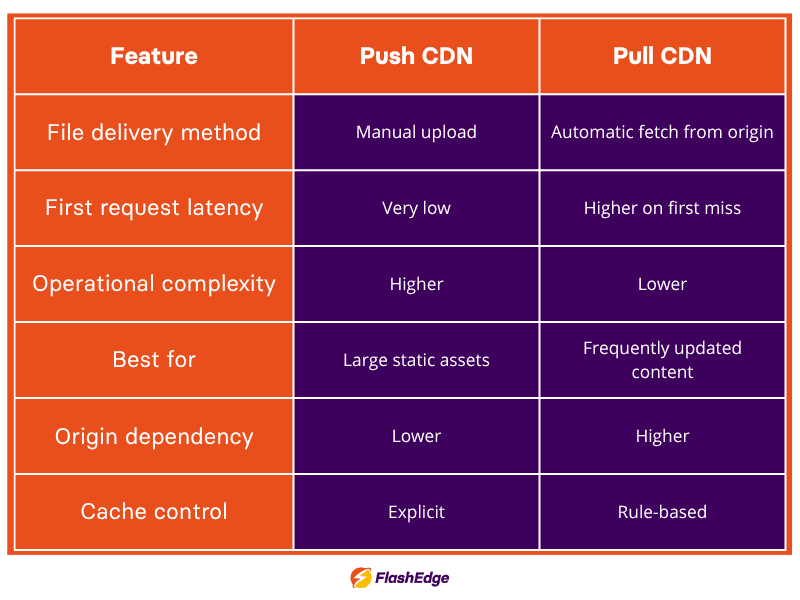
CDN pull vs push for performance and maintenance
In general, pull CDNs tend to be the better fit for frequently changing content, while push CDNs are usually better for predictable assets that need to be pre-positioned at the edge ahead of demand (for example, software releases, media files, or scheduled content launches).
When choosing which CDN setup is best for you, you should also consider internal workflows. Teams with CI/CD pipelines can typically automate push uploads successfully, whereas lean teams benefit from the simplicity of a pull CDN.
Choosing the right CDN strategy for your infrastructure
The right CDN strategy depends on how your content behaves and how many resources your team has available to manage it. A push CDN can be better if files are large, static, and scheduled, but it demands more maintenance (for example, upload workflows, storage planning, regular synchronization). A pull CDN only retrieves content from the origin when it’s requested, so deployment is faster and day-to-day management is simpler.
Pull CDNs are more appropriate in use cases like:
- Websites
- Ecommerce platforms
- APIs
- Applications with regularly changing assets
In practice, many organizations evaluate pull vs push CDN based on content type: pull for dynamic or frequently updated assets, push for very large files that must be pre-positioned before launch. It can often make sense to use a hybrid approach, using different CDNs for different use-cases—for example, serving a frequently updated website, API responses, and product images through a pull CDN, and distributing large software installers, scheduled media releases, or downloadable archives through a push CDN so those files are already positioned for delivery before traffic arrives.
For most modern use cases, starting with a pull CDN is the simplest and most scalable approach. Platforms like FlashEdge make it easy to get started without complex setup—so you can deliver content globally in minutes, reduce latency, and lower infrastructure load. If you want to see how it works in your own environment, you can try it with a free trial.
FAQ: common push and pull CDN questions
What is the main difference between push and pull CDNs?
The main difference is how content reaches the CDN edge. In a push model, files are uploaded to CDN storage before users request them. In a pull model like FlashEdge, the CDN automatically retrieves files from the origin server when the first request arrives, then caches them for future delivery.
Which CDN strategy is better for dynamic content?
Dynamic or frequently updated content usually performs better with a pull CDN because the origin remains the central source of truth and cache refresh rules can be adjusted without manual uploads.
Can I switch between push and pull CDN methods?
Yes. Many CDN providers support migration between delivery methods, and some infrastructures combine both depending on asset type. For example, a business may use a pull-based platform such as FlashEdge for website delivery while keeping push workflows for large downloadable files or scheduled media releases.
Ready to start your journey to low latency and reliable content delivery?
If you’re looking for an affordable CDN service that is also powerful, simple and globally distributed, you are at the right place. Accelerate and secure your content delivery with FlashEdge.
Get a Free Trial