
High-resolution visual content shouldn't cost you user engagement or high bandwidth bills. Today, we're launching FlashEdge Image Optimization, an effortless, zero-code solution designed to deliver blazing-fast visual experiences by automatically converting, resizing, and caching your images directly at the edge.
With zero changes required in your codebase, FlashEdge handles complex media delivery behind the scenes, reducing file sizes by 30–70% while serving the sharpest possible image formats to every single visitor.
How It Works
When a user visits your site, FlashEdge inspects the browser's "Accept" header and automatically delivers the best format supported:
- AVIF: Served to modern browsers like Chrome 85+, Firefox 93+, and Safari 16+.
- WebP: Served as a fast, high-quality fallback for browsers supporting WebP (Chrome 79+, Safari 14+, Edge 79+).
- JPEG: Used as the baseline fallback for older clients.
It doesn't change the URL based on the image format; it just delivers the automatically selected format on the same URL.
The first time a specific variant is requested, FlashEdge transforms the source image, streams it back, and caches it at the edge. Every subsequent visitor receives that pre-generated, optimized variant instantly without re-processing.
More information is available in the documentation.
Flexible URL API: Query Strings & Pretty-URLs
Need precise control over image dimensions or compression for responsive layouts? You can customize images on the fly using standard query parameters or clean path segments.
Query String Parameters
Append simple parameters to any image URL:
https://xyz.flashedgecdn.net/images/photo.jpg?width=400&quality=85
Pretty-URL Path Segments
If you prefer clean HTML templates without query-string escaping, embed comma-separated key-value pairs directly into the path segment:
https://xyz.flashedgecdn.net/width=400,quality=75/my/album/photo.jpg
Smart Mobile & Desktop Presets
Serve custom max width limits, quality levels, and fit modes targeted specifically at mobile devices, all configured with a single toggle in your dashboard.
Transformation Controls
- Width (width / w) & Height (height / h): Set exact target dimensions in pixels.
- Fit (fit): Controls scaling when both dimensions are set:
cover(Default): Crops to fill the target box; overflow is trimmed.contain: Letterboxes inside the box with solid or transparent padding.inside: Shrinks the image to fit inside without adding padding.outside: Resizes so at least one dimension matches the target without shrinking.fill: Stretches dimensions directly, ignoring aspect ratio.
- Quality (quality / q): Adjust compression level from 1–100 (default: 80).
- Format (format / f): Manually override format to avif, webp, or jpeg.
Performance Safeguards & Limits
After selecting measurements, we achieved 80% optimization of the picture with no change in quality.
To keep decode times fast and prevent performance bottlenecks on mobile devices, FlashEdge includes automated guardrails:
- Smart AVIF Downgrades: Origin AVIF images above 4 megapixels automatically downgrade to WebP to keep decode times fast on lower-powered devices.
- 24 Megapixel Ceiling: Origin images exceeding 24 MP are always delivered as JPEG regardless of settings.
- 25 MB Max Input Size: Files larger than 25 MB return a 413 Payload Too Large error.
- Source Error Handling: Missing files return a 404 Not Found (cached for 60 seconds), while permission issues return a 403 Forbidden (cached for 60 seconds).
Best Practices for Peak Performance
- Let the browser pick the format: Omit the
format=parameter unless you have a legacy requirement. Automatic negotiation ensures every browser gets its smallest compatible file. - Match layout widths: Avoid serving 2000px images into 400px mobile viewports. Match the requested width to your layout slots.
- Aim for Quality 75–85: Quality 80 cuts file size roughly in half with no perceptible visual loss. For decorative tiles or small thumbnails, drop down to 70–75.
- Embrace Pretty-URLs: Embedding parameters directly into image paths keeps HTML templates cleaner and avoids query-string escaping issues.
- Enable Mobile Presets: Enable "Use separate mobile preset" in the dashboard to cap mobile image sizes automatically without needing extra front-end code.
Getting Started
Setting up Image Optimization takes less than two minutes from your zone dashboard:
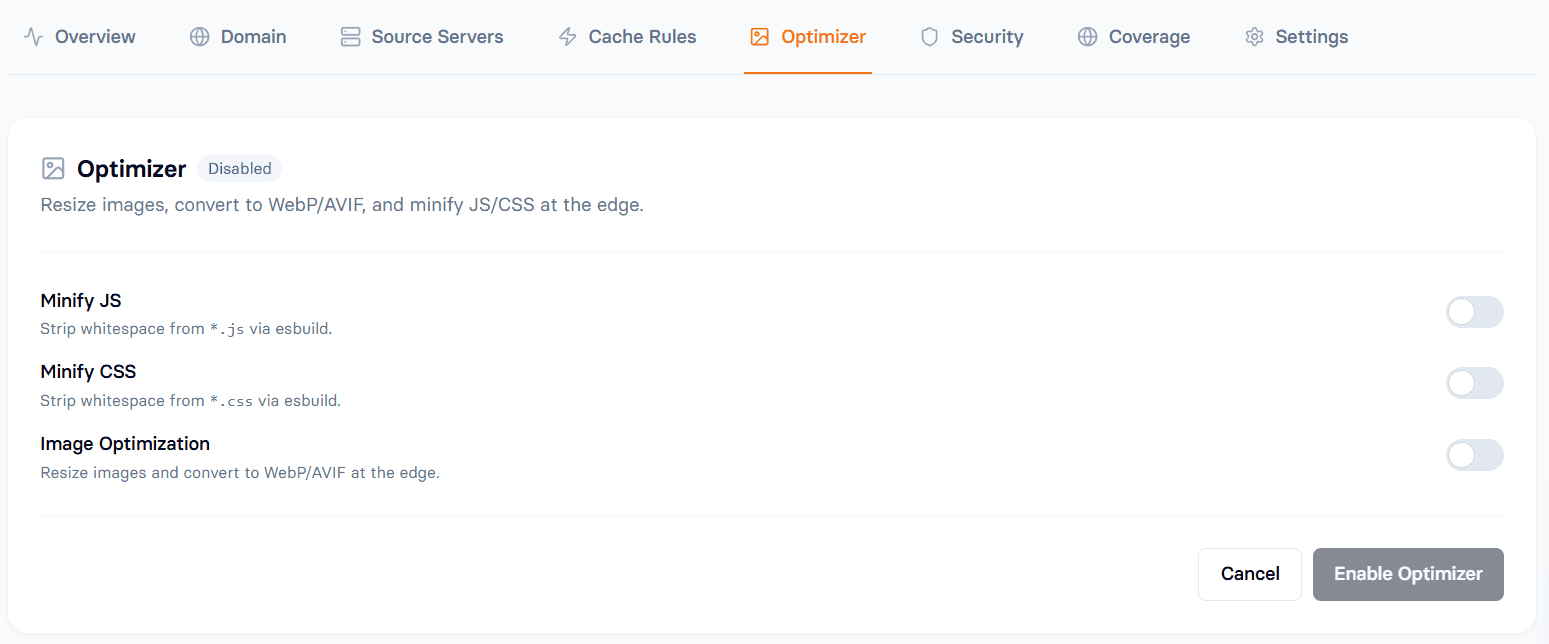
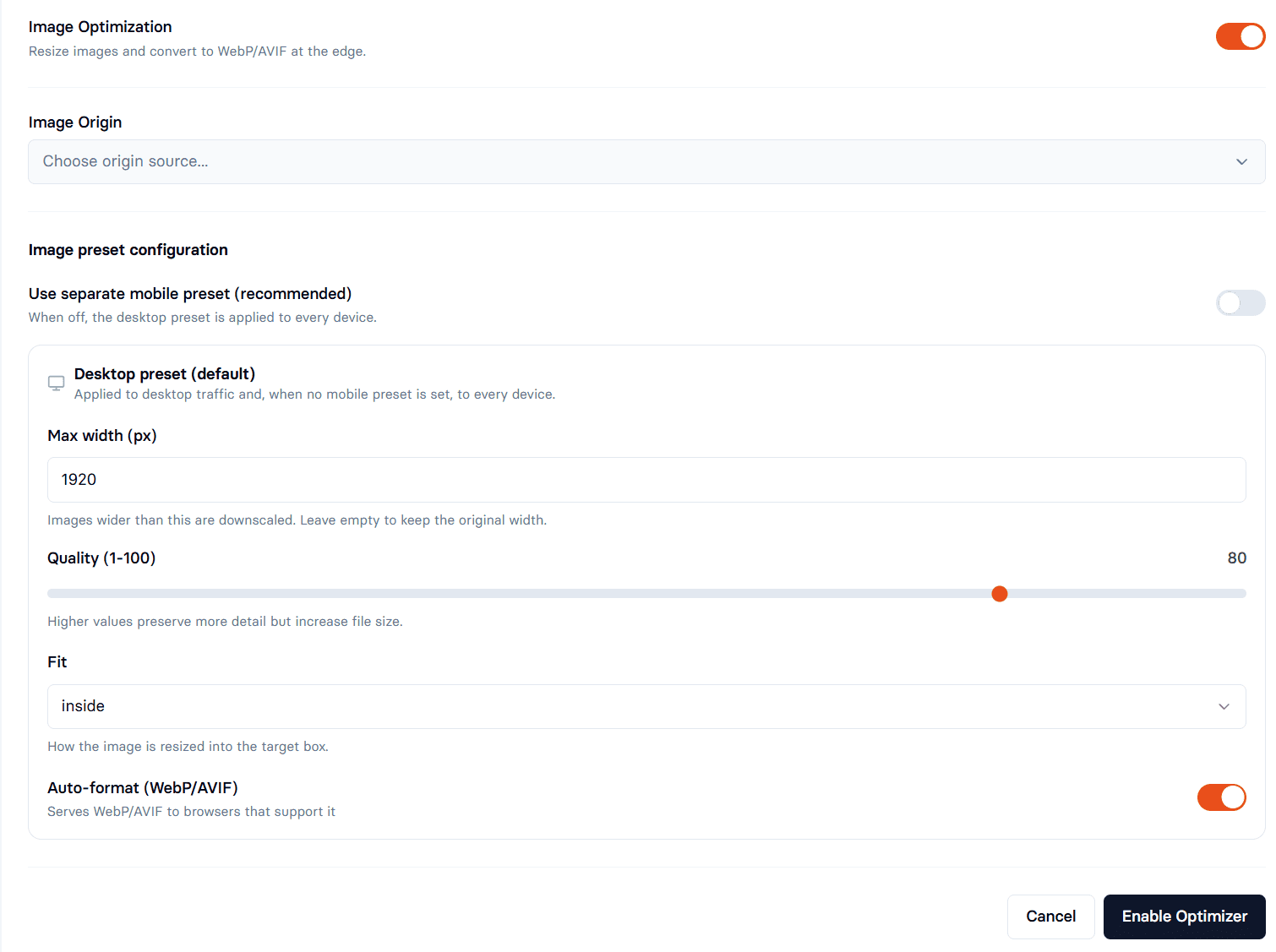
- Open your zone and go to the Optimizer tab.
- Toggle the Image Optimization switch.
- Select an Image Origin (FlashEdge Storage, Source server, or Custom URL).
- Set your default Quality (80 is recommended) and keep Auto-format enabled.
- Click Enable. Deployment usually finishes within 1–2 minutes.
Don't have a FlashEdge distribution? Start here.
Conclusion
Optimizing web media shouldn't require complex build pipelines or endless manual resizing. With FlashEdge Image Optimization, you get automated, edge-cached, dynamic formatting without touching a single line of code.
Frequently Asked Questions
Why was my AVIF image delivered as a WebP?
AVIF source files larger than 4 megapixels are automatically downgraded to WebP to protect lower-powered mobile devices from high CPU decode times.
Why did my image load slightly slower the very first time?
The first request for a new size/format variant triggers an origin fetch, transformation, and cache write. Once generated, all future requests are served instantly from the edge cache.
What causes 403 or 404 errors?
A 404 means the file doesn't exist at your origin path. A 403 indicates your origin server denied access; double-check that your origin allows unauthenticated image fetches.