
File vs Block vs Object Storage: Key Differences, Use Cases, and How to Choose the Right Solution
Behind any content you need to deliver, whether it’s a fast-loading website, smooth video stream, or reliable software download, is a storage system that determines how your content is stored (duh), accessed, and delivered.
Choosing a good storage configuration is like building a good foundation for your content delivery; as your libraries grow, a solid storage configuration ensures that scaling will be easy and speed will remain unaffected.
This article will take you through the differences between object storage, block storage, and file storage in clear, practical terms. You’ll learn what each storage type does, when they’re most applicable, and the role object storage plays in modern CDN platforms like FlashEdge.
💡Quick summary: Block storage vs file storage vs object storage
- Block storage, file storage, and object storage are three different ways to store and manage data in modern infrastructure. Each storage type is optimized for different workloads, from high-performance databases to large-scale content distribution.
- Block storage provides very fast, low-latency performance and is typically used for databases and backend systems.
- File storage organizes data into folders and directories, making it familiar and practical for shared workflows and collaboration.
- Object storage keeps data as independent objects accessed through APIs, which allows it to scale easily to very large datasets.
- Because of its scalability and HTTP-based access, object storage is commonly used as the origin layer for CDN content delivery.
Why storage choices matter for content delivery
Content delivery networks cache content globally so that users can access it from a server near them; they are designed to move data quickly. However it’s easy to overlook another critical layer, and that’s the source the CDN pulls from.
When a CDN needs to:
- refresh cached content,
- distribute new assets globally,
- pull content after cache expiration,
- sync updates across regions
…it depends entirely on the performance and scalability of the storage layer behind it. The CDN can only be as fast as its source allows.
Choosing between file storage, block storage, and object storage affects how easily content can be stored, copied, accessed, and scaled across regions. Understanding the differences will help you to avoid bottlenecks, reduce complexity, and ensure consistent delivery even as your business scales – so read on!
What is block storage, and how does it support performance-critical systems?
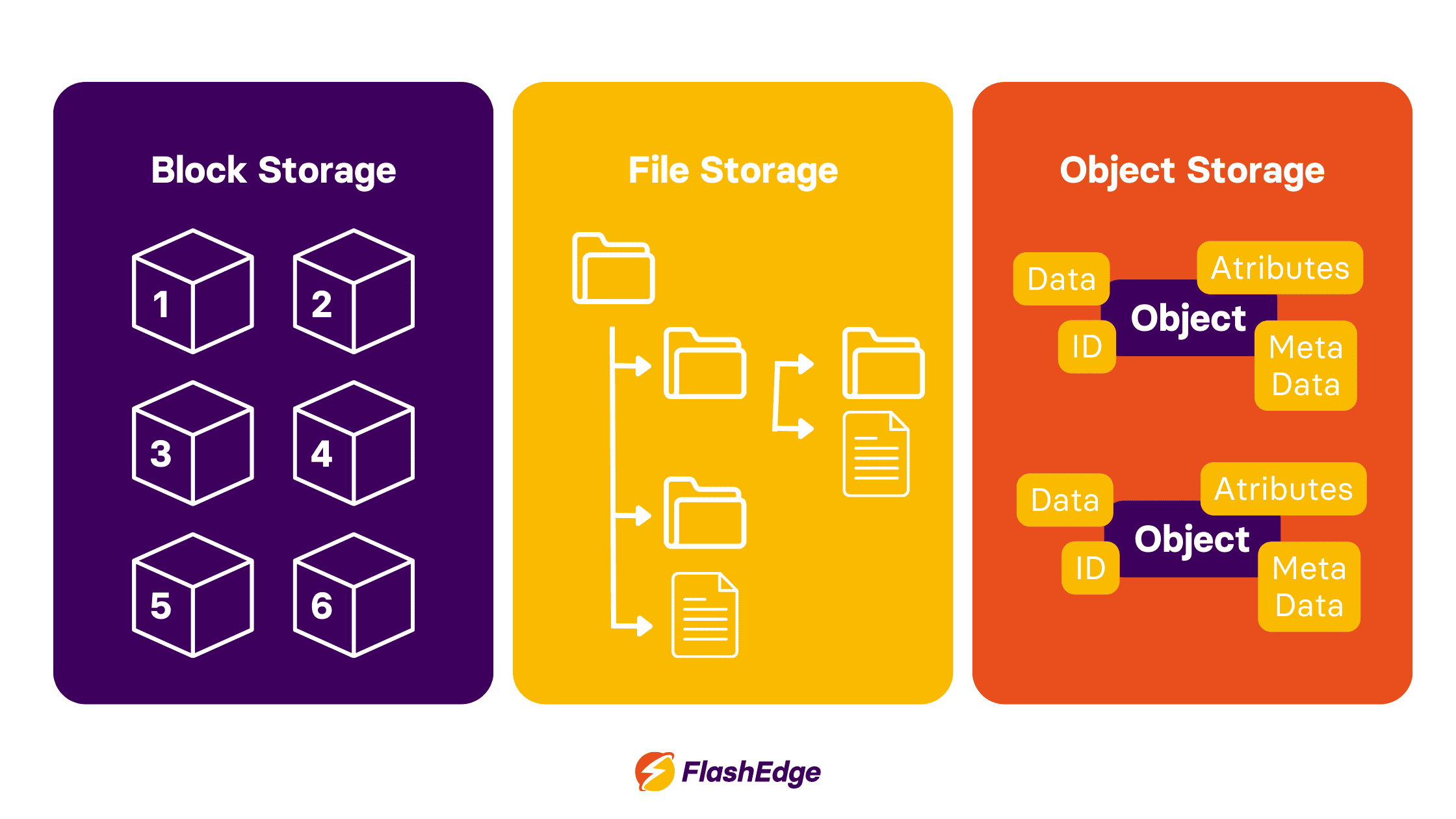
Block storage stores data in blocks; fixed-size chunks which are handled independently and can be accessed via a specific address. It works a lot like a physical hard drive connected to a computer; when an application writes data it doesn’t care about filenames or folders, it just writes data to available blocks. The operating system then determines how to organize these blocks into files.
Because block storage doesn’t rely on any additional structure from within the storage system itself, it has the following benefits:
- Very fast read and write access
- Predictable performance
- Fine-grained control over data placement
Block storage use cases in CDN environments
In CDN architectures, block storage is typically used for internal systems as opposed to content delivery itself. Block storage is ideal for:
- Databases that track configurations and usage data
- Logging and monitoring systems
- Control-plane services that need to be updated frequently
What is file storage, and why does it feel familiar?
File storage organizes data in a way that most users are familiar with; files are stored inside folders in a hierarchical tree structure. This hierarchy is intuitive for most users and is widely supported.
When you save a file to a shared drive or network folder, you’re using file storage. The system keeps track of where the file lives within a directory tree, and you can retrieve it by following the file path.
File storage use cases
File storage is often used in content workflows that involve people actively working with files, for example:
- Media production and editing environments
- Shared asset repositories
- Legacy applications that still expect folders and filenames
What is object storage, and how is it ideal for CDNs?
Object storage takes a different approach. Instead of folders or blocks, data is stored as independent objects in a flat system.
How object storage works?
Each object contains:
- the data itself (for example, an image or video),
- metadata that describes the object,
- a unique identifier used to retrieve it.
There are no folders or hierarchies to navigate. Instead, applications request objects directly using APIs, usually over HTTP – the same protocol used by CDNs to fetch and serve content.
Why object storage fits CDN architectures
Because object storage doesn’t rely on directory hierarchies, it can scale almost without limit; if you need to add more storage, you won’t need to reorganize any of your existing data.
This makes object storage ideal for:
- CDN origin storage,
- large media libraries,
- static assets which are accessed globally.
In object storage vs file storage vs block storage comparisons, object storage consistently offers the best balance of scalability, durability, and cost efficiency for unstructured content. AWS has an in-depth explainer about this – check it out here.
Block storage vs file storage vs object storage full comparison
For a clearer picture of the differences between block, file, and object storage, check out the comparison table below.
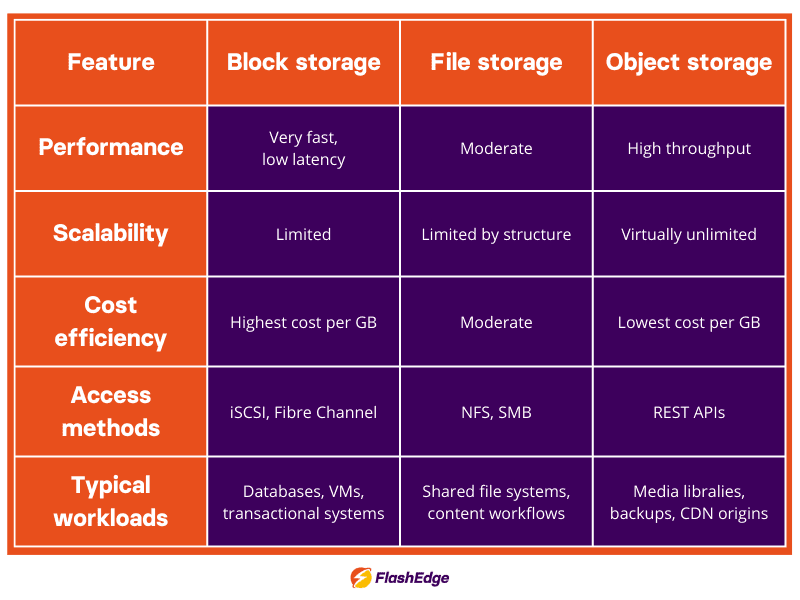
As you can see in the table above, object storage offers the best combination of scalability, cost efficiency, and API-based access. This is why it is commonly used as the origin storage layer for modern CDNs.
Block storage vs object storage
To understand which storage option is most appropriate, it can help to notice the differences between block storage and object storage. Block storage behaves like a private, high-speed workspace where data is stored in fixed-size blocks and accessed directly by the operating system.
Object storage, by contrast, is designed for storing large collections of content as independent objects rather than blocks.
While block storage focuses on low-latency access for transactional workloads such as databases or virtual machines, object storage is optimized for scalability and managing large volumes of unstructured data such as images, videos, and backups.
File storage vs object storage
For more clarity, let's compare file storage vs object storage. File storage offers simplicity, but is not the most scalable storage option; as directories grow and get more complex, performance decreases and continued management becomes much harder. This difference is especially noticeable for global CDN use cases.
Object storage removes this hierarchy and stores data as independent objects identified by metadata and unique IDs, typically accessed through APIs. This architecture allows object storage to scale far more efficiently for large, distributed datasets such as media libraries, backups, or CDN assets.
When to use block storage, file storage, or object storage in CDN platforms
Use block storage for internal system performance
Block storage is ideal for supporting your databases, backend systems, and your internal app data. It has extremely low latency, which means it works well as storage support for:
- E-commerce platforms
- SaaS apps
- Systems needing high IOPS
- Transactional backends
Block storage supports your backend, but due to its limited metadata capacity and its inefficiency in managing large content files, it isn’t suitable for supporting your CDN content layer.
Use file storage for collaboration
File storage’s simple navigation and intuitive use make it great for collaborating with your team, for CMS platforms which write to shared media directories, or for providing directory structure and file-locking.
The best use cases for block storage vs file storage are distinct; block storage is used for automated delivery systems, whereas most day-to-day human workflows are accessed through file storage.
Use object storage for content delivery at scale
Object storage is extremely durable, is cost-efficient even at an extremely large scale, and it scales automatically. Because of this, it’s perfect for:
- Distributing static content (images, videos, JS, CSS, PDFs) or running static websites
- Building scalable content platforms
- Hosting media libraries
What’s more, CDNs are built to cache content fetched over HTTP/HTTPS, and object storage fits this model perfectly; only object storage is HTTP native, which enables many CDN features. For example, object storage supports FlashEdge CDN by enabling fast origin access, efficient replication, and simplified management.
Check out AWS’ deep-dive comparison of block, file, and object storage for more details.
Pros and cons of block, file, and object storage
Block storage
🟢Benefits: Speed, predictability
🔴Drawbacks: Expensive and difficult to scale for content
File storage
🟢Benefits: Easy to understand and use
🔴Drawbacks: Poor scalability for large datasets
Object storage
🟢Benefits: Massive scalability, cost efficiency, HTTP-native
🔴Drawbacks: Less suited for frequent small updates
How object storage strengthens FlashEdge CDN
Modern content delivery depends on more than edge locations, it also depends on how content is stored and accessed behind the scenes. While block storage, file storage, and object storage each serve a purpose, and ideally the three would be used together, object storage provides the scalability and flexibility required for global CDNs.
By using object storage as the origin layer and supporting it with block and file storage where appropriate, FlashEdge CDN delivers reliable performance while keeping operations efficient. By taking this balanced approach, you can reap the benefits of all three storage methods, turning storage into an advantage rather than a limitation. Using all three where appropriate is the first step toward building a faster, more resilient CDN foundation.
Want to see how object storage can power your CDN origin? Start a FlashEdge free trial and explore how scalable storage and global edge delivery work together to distribute content faster.
Ready to start your journey to low latency and reliable content delivery?
If you’re looking for an affordable CDN service that is also powerful, simple and globally distributed, you are at the right place. Accelerate and secure your content delivery with FlashEdge.
Get a Free Trial